
Help centerPush notificationsAutomations
Automations
Automations are pushes that send themselves when a guest does, or doesn't do, something. They run in the background once you switch them on.
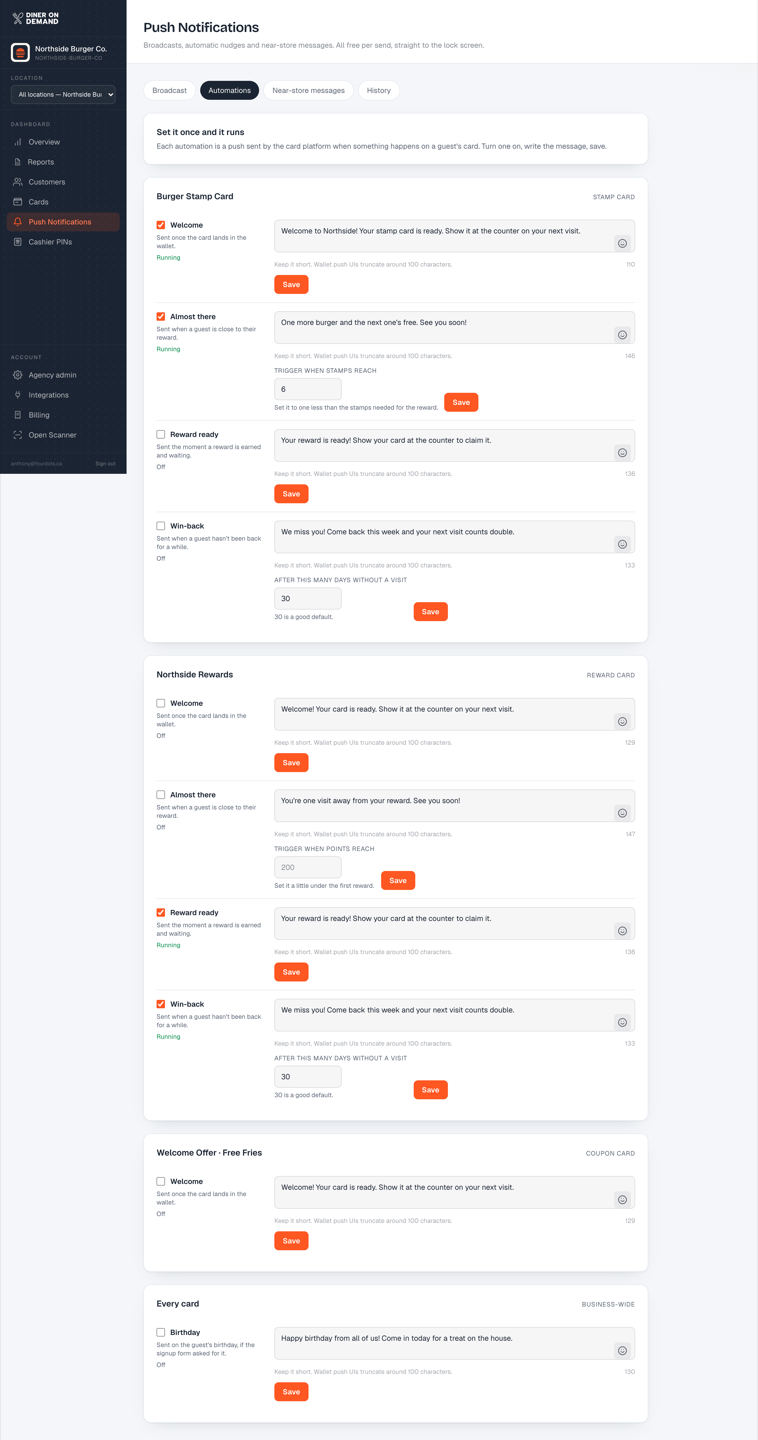
The built-in automations
| Automation | When it sends |
|---|---|
| Welcome | Right after a guest installs the card |
| Almost there | When a guest is one stamp from a reward and hasn't visited in a while |
| Reward ready | The moment a reward unlocks |
| Win-back | When a regular hasn't visited for a set number of days |
| Birthday | On the guest's birthday, if your signup form collects it |
Each one has a message you can edit and a switch to turn it on or off. The defaults are written to work as they are; change the wording to match your voice, and keep the offer in the first line.
Tips
- Almost there and Win-back are the two that move repeat rate the most. Turn those on first.
- Give the win-back a real offer. A reminder alone rarely brings a lapsed guest back; a free side does.
- Your coach's notes on the Overview tell you when an automation is running but not landing, so you know which message to strengthen.
Still stuck? Email support@dinerondemand.com.