
Help centerCardsEditing a card
Editing a card
Open Cards and click Edit under any card. Changes reach every installed pass as wallets refresh, usually within minutes.
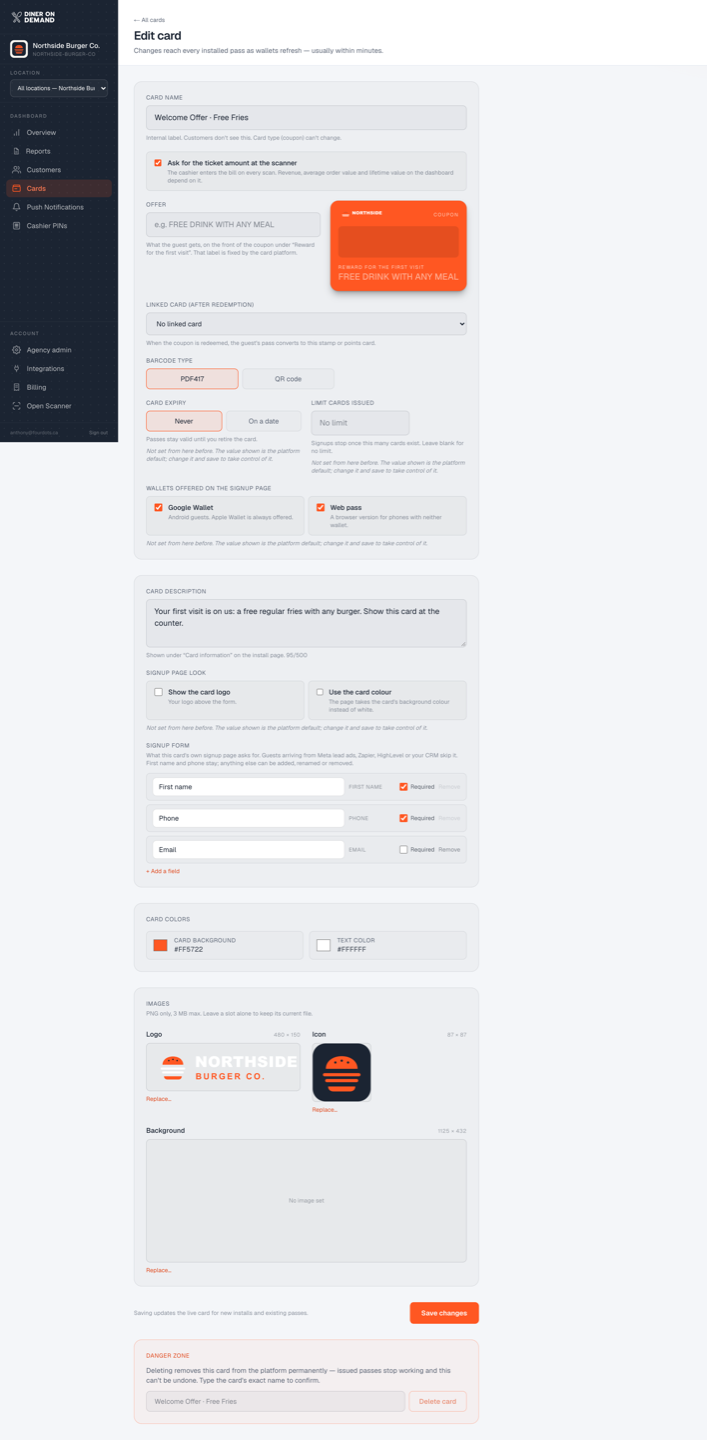
What you can change
- Name, and for coupons the offer and the linked card.
- Ticket amount at the scanner on or off.
- Card expiry, issue limit, wallets offered and signup page look. See Card settings.
- Barcode type and colours.
- Description and the signup form fields. First name and phone stay; anything else can be added, renamed or removed.
- Points per dollar, rewards, scans per day and happy hours on a points card. Removing a reward takes it off every installed pass.
- Stamps to earn a reward, the reward and its details, the two pass texts and the daily stamp cap on a stamp card. Changing the stamp count reaches every installed pass; a guest mid-card keeps the stamps they have.
- Images. Upload a new PNG in any slot to replace the current file. Leave a slot alone to keep it.
What you can't change
The card type. If you need a different mechanic, create a new card.
Deleting a card
Deleting is reserved for the Diner On Demand team, because a card with thousands of installed passes deserves more friction than a click. Email support@dinerondemand.com if a card should go. Retiring a card by setting an expiry date is usually the better option: existing passes stop working on the date and nothing is lost from your reports.
Still stuck? Email support@dinerondemand.com.