
Help centerMulti-location settingsReports by location
Reports by location
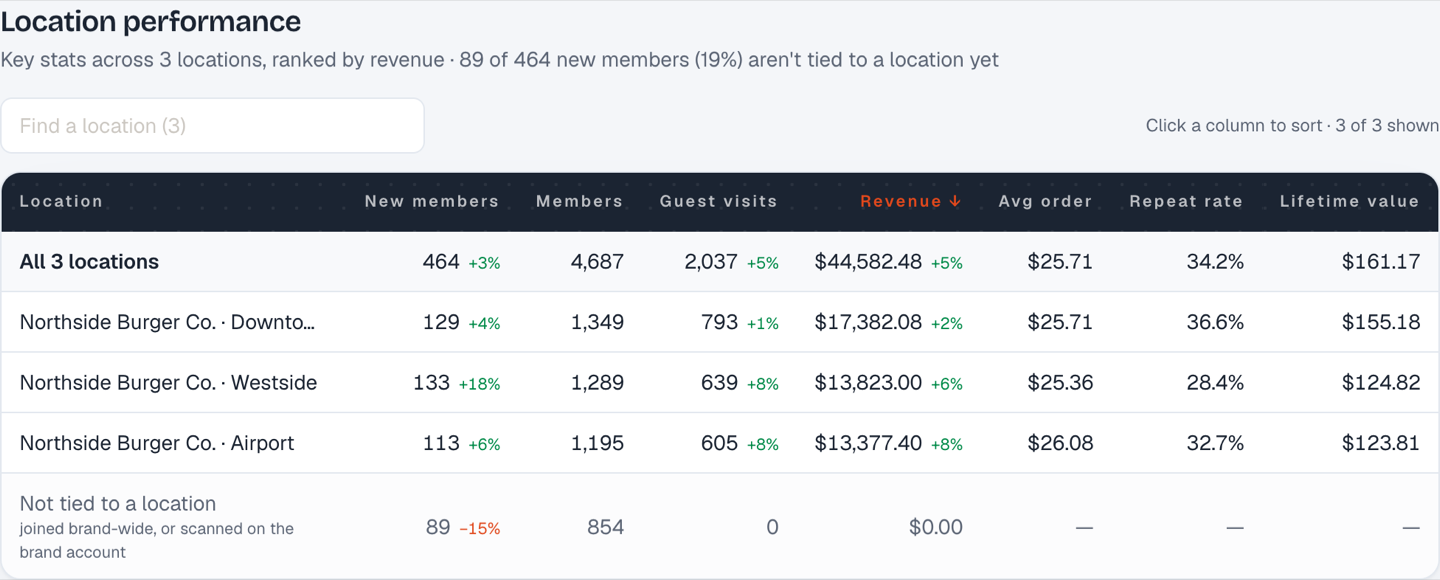
A report for a multi-location brand adds a Location performance table: one row per location, the same columns as the headline figures, a totals row, and a search box for brands with dozens of stores.
Choosing locations
When you create the link, pick All locations or tick a subset. A franchisee can be sent a report of just their store; head office gets everything.
"Not tied to a location"
The last row holds members and activity that couldn't be attributed to a store. The most common reasons:
- The guest signed up on the brand-wide signup page rather than a location's page.
- The guest came from a Meta lead form that isn't mapped to a location.
- The guest has a card but has never been scanned.
The brand total always includes this row, so the location rows plus the remainder add up to the brand.
Reducing the remainder
- Give each store its own signup page link and QR code. See Signup pages by location.
- Map location-specific lead forms to their location. See Lead forms mapped to locations.
- Make sure every store has a cashier PIN and uses it. A first scan on a location's PIN attributes the member.
Still stuck? Email support@dinerondemand.com.